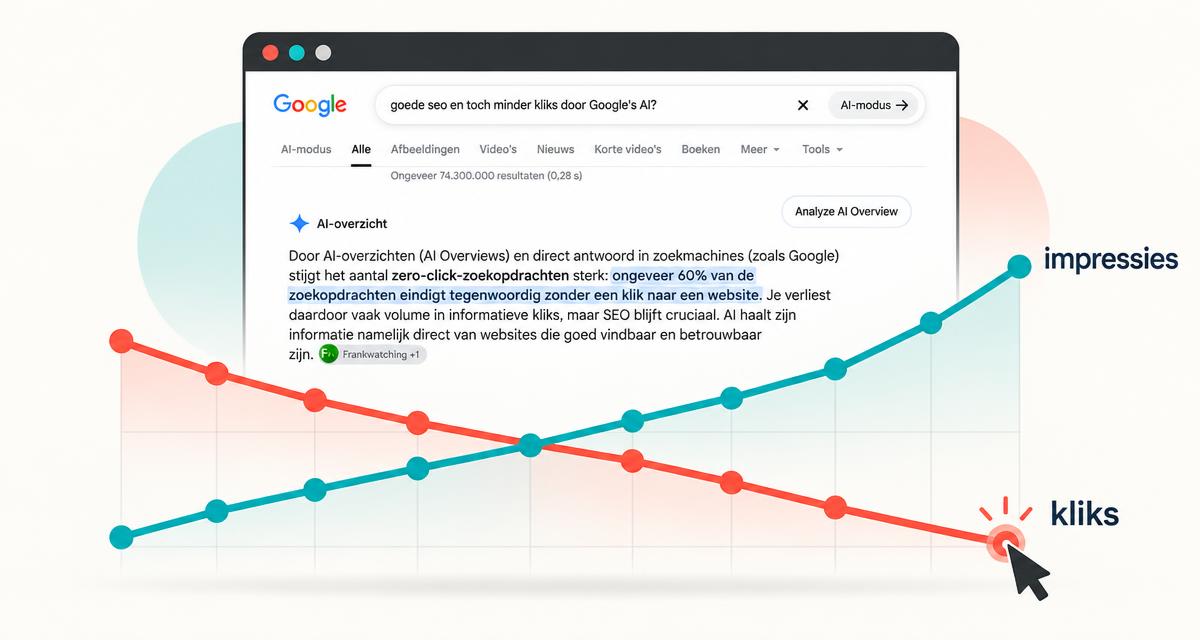
Your website's SEO looks good. But you're getting fewer and fewer visitors. Could Google's AI Overview be the cause?
Short answer: Google increasingly answers searches itself, so fewer people click through to websites, even when you rank well. AI Overviews and direct answers in search engines such as Google are driving a sharp rise in zero-click searches: around 60% of searches now end without a click through to a website. As a result, you often lose informational click volume, but SEO remains crucial. AI draws its information directly from websites that are easy to find and trustworthy.
What is Google AI Mode?
Google AI Mode is a search mode in which Google answers your question with a full AI-generated response instead of a list of links, with room for follow-up questions. It sits next to AI Overviews, the AI summaries above the regular results. Both mean users get their answer on Google itself, which changes how much traffic your website receives.
Google began rolling out AI Mode in the Netherlands and in Dutch on 8 October 2025 (Source: Google, 2025). It appears as a separate tab in Google Search and in the Google app. Under the hood, Google splits your question into sub-questions and runs multiple searches at once (a technique Google calls "query fan-out").
Why your clicks are dropping: what the data says
This isn't a hunch anymore. Several large studies now point in the same direction.
AI Mode: 18.8 percentage points fewer clicks. Researchers from the University of Pennsylvania and Northeastern University ran a preregistered field experiment with 1,100 US Chrome users. AI Mode reduced the click-through rate to external websites by 18.8 percentage points. It also lowered users' trust and satisfaction, and pushed 11.2 percentage points more users towards Bing, DuckDuckGo or Yahoo (Source: University of Pennsylvania & Northeastern University, 2026). The research is a preprint; this result applies to the experimental setup and does not predict the click loss for every website.
AI Overviews: #1 gets 58% fewer clicks. Ahrefs analysed 300,000 keywords. For keywords that trigger an AI Overview, the click-through rate of the top result was 58% lower than expected without the overview (Source: Ahrefs, 2026). This is a comparison between keyword groups using Search Console data, not proof that an AI Overview causes every individual page to lose exactly 58% of its clicks.
Even paid clicks take a hit. Seer Interactive tracked 3,119 informational queries across 42 organisations. Where an AI Overview appeared, organic CTR fell from 1.76% to 0.61% and paid CTR from 19.7% to 6.34% (Source: Seer Interactive, 2025).
Rising impressions alongside fewer clicks are a signal to investigate, not proof that AI features caused the decline. Query mix, seasonality and changes to the search results can also contribute.
How to check whether Google AI Mode is costing you clicks: 5 steps
A drop in traffic can have many causes. Before you blame AI, run through these steps.
Step 1: Compare impressions and clicks in Search Console
Open Google Search Console → Performance → Search results. Select the last 16 months and turn on clicks, impressions, CTR and average position.
The AI pattern looks like this: impressions stable or rising, CTR falling, average position roughly unchanged. Researchers call this "the great decoupling". If your position dropped as well, investigate a ranking problem too; several causes can occur at the same time.
Step 2: Split informational and commercial queries
In the Queries tab, filter on question words such as "what", "how", "why" or "best". Compare the CTR of those queries with your branded and product-related queries.
Example: a SaaS company sees CTR on "what is lead scoring" drop sharply, while "[brand] pricing" stays stable. That is a pattern worth investigating for AI Overviews, not proof of the cause. A health clinic might see the same for "what helps against snoring", but not for "snoring clinic Eindhoven".
Step 3: Google your top queries yourself
Take your 10 queries with the biggest CTR drop and search them in a private window. Is there an AI Overview? What does the AI Mode tab say? Is your site cited as a source, or a competitor's?
Keep in mind that results vary by user and location, so treat this as a spot check, not hard data.
Step 4: Check the generative AI reports in Search Console
Google introduced Search Generative AI performance reports on 3 June 2026. According to its updated announcement, these insights have been rolled out worldwide since 31 August 2026 (Source: Google, 2026). The dedicated Search and Discover views show impressions within generative AI features, broken down by page, country and date; Search also includes device data.
Use these reports as additional information about your visibility in AI Overviews and AI Mode. The announcement describes impressions, not a dedicated click report that lets you calculate the exact loss caused by AI. This data is also included in the overall performance report. More impressions and fewer clicks alone do not establish the cause.
Step 5: Look at conversions, not just sessions
Open Google Analytics 4 and compare leads, demo requests or sales from organic search over the same period. The clicks you lose are often quick informational questions that would rarely convert anyway.
If clicks drop but leads stay stable, you're losing pageviews, not revenue. If leads drop too, it's time to act.
Common mistakes when traffic drops
- Immediately rewriting all content. Without the diagnosis above, you may be fixing the wrong problem.
- Judging only on traffic. Fewer sessions with stable conversions isn't a crisis. Report on leads and revenue.
- Shifting everything to Google Ads. Paid CTR also drops when an AI Overview appears (see Seer's numbers above). Advertising isn't an automatic escape route.
- Ignoring other causes. Core updates, seasonality, technical issues and tracking changes can produce the same graph.
- Waiting for things to go back to normal. Google is rolling AI out further, not less. This is a structural shift.
So what do you do about it?
If your research points to an impact from AI Mode, the question changes. It's no longer "how do I rank higher?" but "how do I become the source the AI answer cites?" That's what generative engine optimization (GEO) or Answer Engine Optimization (AEO) is about. Explore our approach to GEO and AI visibility.
There's an upside: brands cited in AI Overviews received about 35% more organic clicks than brands that weren't cited (Source: Seer Interactive, 2025). The researchers note this may also reflect stronger brands, but either way, being cited beats being invisible.
Want help? Have a look at our approach to GEO and AI visibility and SEO.
Conclusion
Fewer clicks from Google doesn't automatically mean your SEO is failing. Google AI Mode and AI Overviews answer more and more questions directly, and that mainly costs informational clicks. Start with the five-step check: compare impressions and CTR, split your queries, check the AI results yourself, and look at conversions instead of sessions. Only then decide whether you need to act, and what to do.
Next step: open Search Console today and compare the last 3 months with the same period last year. Seeing impressions rise and CTR fall? Let's look at it together.
---
Sources
- University of Pennsylvania & Northeastern University – AI in Search Reduces Publisher Referrals Without Improving User Experience (2026)
- Ahrefs study – AI Overviews reduce #1 CTR by 58% (2026)
- Seer Interactive study – organic CTR −61%, paid CTR −68% (2025)
- Google – AI Mode comes to Google Search in the Netherlands (2025)
- Google Search Central – Search Generative AI performance reports (2026)
- PPC Land – AI Mode counts toward Search Console totals (2025)